Space tab
The Space tab in LCO Producer Strings controls how the instrument layers are sent to a final reverb.
The Space tab in LCO Producer Strings controls how the instrument layers are sent to a final reverb. Each layer has a send level that determines how much of its signal is processed by the reverb. The Space tab also lets you choose the reverb type and adjust its parameters.
The Space tab consists of the following elements and controls:
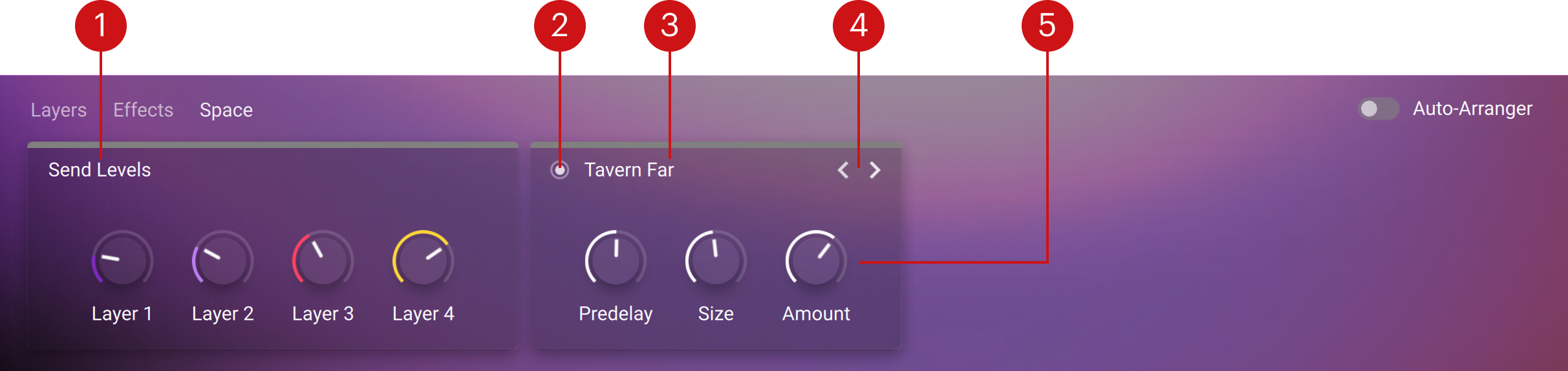
Send Levels: Contains one control for each layer, adjusting how much signal is sent to the reverb. These controls are identical to the Space controls in the Layers tab. Changing one updates the other.
On/Off switch: Toggles the reverb on or off for the entire instrument.
Reverb name: Displays the currently loaded reverb. Clicking the name opens the Space list, where you can select a different reverb type. Refer to Space List.
Arrows (< >): Step through the available reverbs one by one.
Reverb controls: Adjust Predelay, Size, and Amount controls of the selected reverb.
Space List
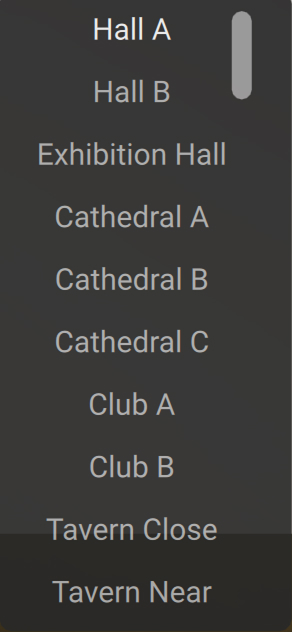 |
The Space list shows all available reverb types that can be loaded into the Space unit. To open the list, click the reverb name on the Space unit, in the Space tab. The Space unit must be switched on to access the list. Selecting a reverb from the list replaces the current one, and the controls (Predelay, Size, and Amount)further customize its sound.
For detailed information about the Space controls and Send Levels, refer to Space tab.
Send Levels
The Send Levels unit determines how much of each layer's signal is sent to the Space reverb. It contains one control per layer, labeled Layer 1-4. Increasing a control sends more of the layer's signal to the reverb. Reducing to zero removes the layer from the reverb entirely. This allows you to balance how strongly each layer contributes to the overall reverb effect.
Note
Each control here is the same as the Space knob for the corresponding layer in the Layers tab. Adjusting one, automatically updates the other.
Space
Space is the LCO Producer Strings global reverb, which is applied in parallel to the Effects chain. It adds spaciousness and depth to the overall sound of the instrument using the following controls:
Predelay : Sets the time between the dry sound and the start of the reverb, preserving attack clarity before the reverb tail is heard.
Size: Adjusts the virtual space, with higher values producing longer and more expansive reverb tails.
Amount: Controls the reverb return level (wet level) in the final output. This is independent of the Send Levels, which set how much of each layer is sent to the reverb.