Effects
SuperStarSaw includes three main effects for adding extra depth and dimension to your sounds.
SuperStarSaw includes three main effects for adding extra depth and dimension to your sounds: chorus, delay, and reverb.
 |
Using effects
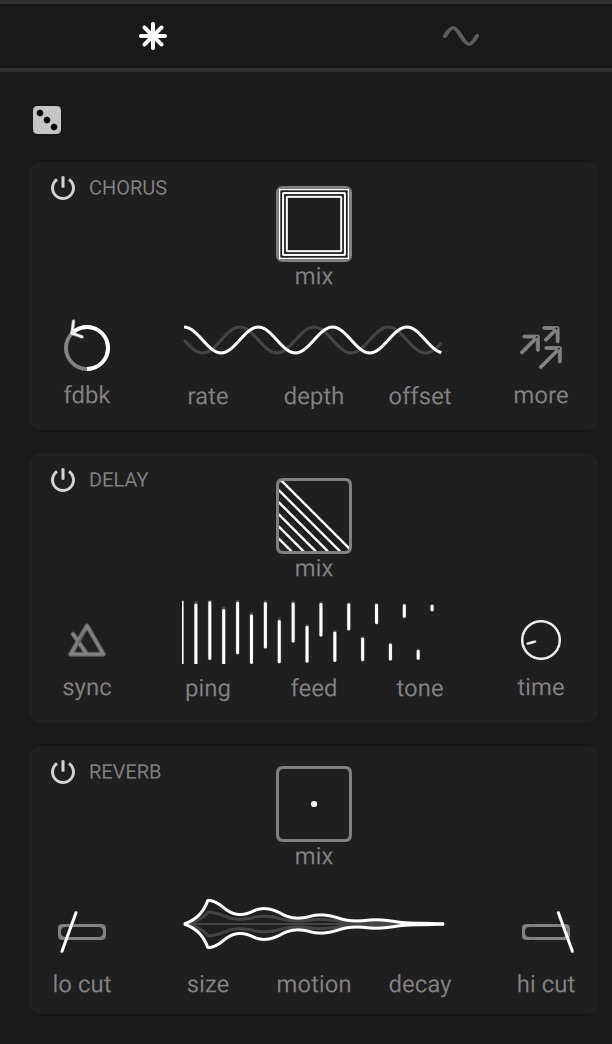
A stereo Chorus effect introduces even more thickness and weight. The Rate and Depth controls determine the speed and strength of modulation, while the Offset control increases the stereo effect. Clicking the More button engages the ensemble mode, adding even more modulation and complexity to the chorus effect.
The stereo Delay processor can go all the way from tight metallic resonances, all the way to distant echos. Use the Time control to set how fast the delay repeats, and use the Sync button to lock those repeats to your song tempo. The Feed control determines how long the repeats will continue for, while the Tone and Ping controls set the color and stereo width of the delay respectively.
Finally, the stereo Reverb effect adds a whole other dimension to your sounds. The Size control allows for all manner of virtual spaces, from tiny chambers to galactic voids, and the Decay control determines how slowly the reverb dissipates. The Motion control introduces modulation to the reverb, breaking up metallic ringing into diffuse washes of sound. Lastly, the Lo cut and Hi cut controls sculpt the amount of low and high frequencies within the reverberation.
Note
To learn more about a control, hover your mouse over it to show a description in the info pane at the bottom of the instrument.